
RoyalAlert: SweetAlert2-এর বিকল্প হিসেবে নতুন বাংলা ওয়েব ডেভেলপমেন্ট টুল
ওয়েবসাইট বা ওয়েব অ্যাপ্লিকেশনে কোনো কাজ সফল হয়েছে, ব্যর্থ হয়েছে, ব্যবহারকারীর কাছ থেকে অনুমতি নিতে হবে কিংবা কোনো তথ্য দেখাতে হবে, এমন পরিস্থিতিতে alert, confirmation dialog, toast notification বা modal-এর প্রয়োজন হয়। সাধারণ JavaScript-এর alert() দিয়ে এসব কাজ করা গেলেও আধুনিক ওয়েব অ্যাপ্লিকেশনের জন্য সেটি অনেক সময় যথেষ্ট নয়।
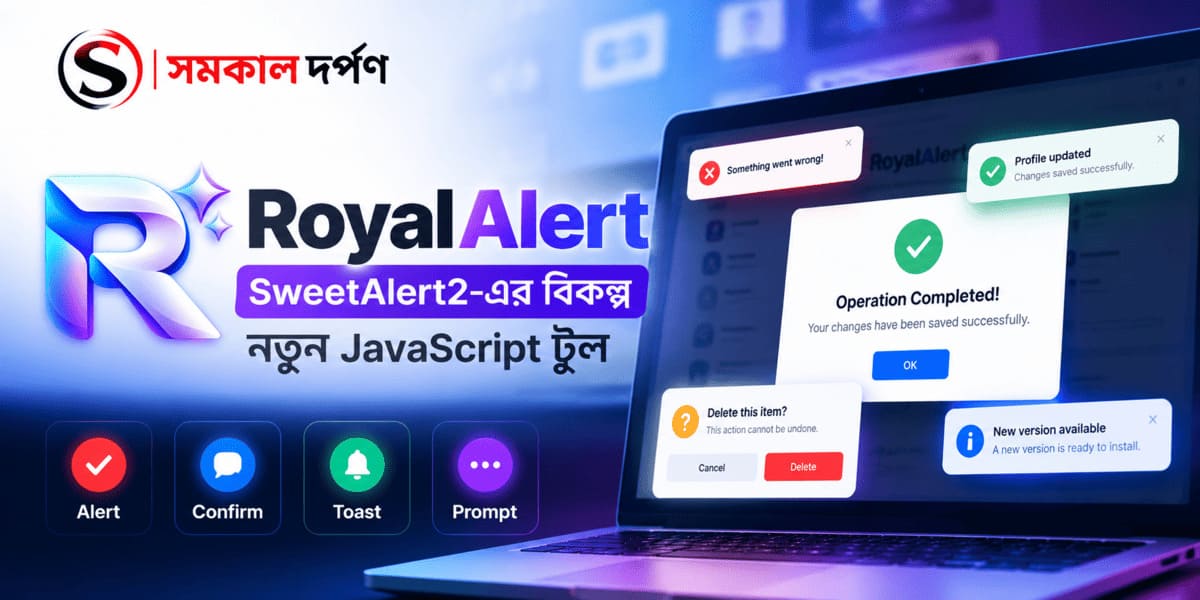
এই কাজকে সহজ করার জন্য JavaScript ecosystem-এ বেশ কিছু জনপ্রিয় library রয়েছে। এর মধ্যে SweetAlert2 অন্যতম পরিচিত নাম। এবার সেই ধরনের কাজের জন্য নতুন একটি lightweight JavaScript library নিয়ে এসেছে বাংলাদেশের প্রযুক্তি প্রতিষ্ঠান Royal Technologies। লাইব্রেরিটির নাম RoyalAlert।
RoyalAlert কী?
RoyalAlert হলো একটি lightweight, modern এবং zero-dependency JavaScript alert, toast, confirmation, prompt, loading dialog এবং modal library।
এটি সম্পূর্ণ Vanilla JavaScript এবং CSS দিয়ে তৈরি। অর্থাৎ RoyalAlert ব্যবহার করার জন্য jQuery, Bootstrap বা অন্য কোনো JavaScript framework প্রয়োজন হয় না।
বর্তমানে RoyalAlert-এর source code GitHub-এ public repository হিসেবে প্রকাশ করা হয়েছে এবং একটি interactive demo-ও রয়েছে।
GitHub:
https://github.com/Royal-Technologies/RoyalAlert
Demo:
https://royal-technologies.github.io/RoyalAlert/demo/index.html
কেন RoyalAlert তৈরি করা হয়েছে?
একটি ওয়েবসাইটে alert বা notification দেখানোর জন্য প্রতিবার নতুন করে modal তৈরি করা, CSS লেখা এবং JavaScript দিয়ে interaction পরিচালনা করা বেশ সময়সাপেক্ষ।
RoyalAlert সেই কাজটিকে একটি সহজ API-এর মধ্যে নিয়ে আসে।
যেমন, একটি success message দেখাতে কয়েক লাইনের code-ই যথেষ্ট:
RoyalAlert.success('Saved successfully!');একইভাবে error, warning এবং information message-এর জন্যও shorthand method রয়েছে।
RoyalAlert.error('Something went wrong.');

RoyalAlert.warning('Session expires in 5 minutes.');

RoyalAlert.info('A new version is available.');
ফলে developer-কে প্রতিটি project-এ একই ধরনের alert system নতুন করে তৈরি করতে হয় না।
Zero Dependency হওয়ার সুবিধা
RoyalAlert-এর অন্যতম উল্লেখযোগ্য বৈশিষ্ট্য হলো এর zero-dependency architecture।
এটি jQuery, Bootstrap বা অন্য কোনো framework-এর ওপর নির্ভরশীল নয়। ফলে সাধারণ HTML website থেকে শুরু করে web application এবং WordPress project পর্যন্ত বিভিন্ন পরিবেশে এটি ব্যবহার করা যায়।
RoyalAlert-এর GitHub documentation অনুযায়ী JavaScript এবং CSS মিলিয়ে এর bundle size প্রায় ৫ KB gzipped।
ছোট project-এর পাশাপাশি performance-sensitive website-এর ক্ষেত্রেও lightweight library ব্যবহার করার সুবিধা রয়েছে।
Confirmation Dialog
কোনো তথ্য মুছে ফেলার আগে ব্যবহারকারীর কাছ থেকে confirmation নেওয়া web application-এর খুব সাধারণ একটি প্রয়োজন।
RoyalAlert-এ confirmation dialog তৈরি করা যায় Promise-based API ব্যবহার করে।
const result = await RoyalAlert.confirm({
    title: 'Delete item?',
    message: 'This cannot be undone.'
});

if (result.confirmed) {
    deleteItem();
}
ব্যবহারকারী Confirm করলে confirmed পাওয়া যাবে। Cancel করলে cancelled result পাওয়া যায়।
এই ধরনের structure asynchronous JavaScript application-এর সঙ্গে সহজে ব্যবহার করা যায়।
Toast Notification
প্রতিটি notification-এর জন্য বড় modal দেখানোর প্রয়োজন নেই।
কোনো profile update হয়েছে, data save হয়েছে কিংবা ছোট কোনো status message দেখাতে toast notification বেশি উপযোগী।
RoyalAlert-এ toast-এর জন্য আলাদা API রয়েছে।
RoyalAlert.toast({
    type: 'success',
    message: 'Profile updated.',
    position: 'top-right'
});
লাইব্রেরিটিতে মোট ৯টি toast position রয়েছে। এগুলো হলো top-left, top-center, top-right, middle-left, middle-center, middle-right, bottom-left, bottom-center এবং bottom-right।
Prompt ও Input Validation
কখনো কখনো ব্যবহারকারীর কাছ থেকে alert-এর মধ্যেই কোনো তথ্য নেওয়ার প্রয়োজন হয়।
RoyalAlert prompt system ব্যবহার করে text, email, password, number, textarea এবং select ধরনের input নেওয়া যায়।
এর সঙ্গে asynchronous input validation-ও রয়েছে।
উদাহরণ হিসেবে email validation:
const result = await RoyalAlert.prompt({
    title: 'Enter your email',
    inputType: 'email',
    inputPlaceholder: '[email protected]',

    inputValidator: async (value) => {
        if (!value) {
            return 'Email is required.';
        }

        if (!value.includes('@')) {
            return 'Please enter a valid email address.';
        }
    }
});
Validation সফল না হওয়া পর্যন্ত dialog open রাখা যায়।
Loading এবং Async Operation
কোনো website-এ server request চলার সময় user-কে loading status দেখানো প্রয়োজন হয়।
RoyalAlert-এর async() method ব্যবহার করে loading থেকে success অথবা error state পর্যন্ত একটি workflow তৈরি করা যায়।
await RoyalAlert.async({
    title: 'Saving...',
    action: async () => {
        const response = await fetch('/api/save');

        if (!response.ok) {
            throw new Error('Server error');
        }

        return response.json();
    },
    successMessage: 'Saved!',
    errorMessage: 'Could not save.'
});
এছাড়া library-তে request() helper রয়েছে, যা fetch()-এর সঙ্গে loading, success এবং error state পরিচালনা করতে পারে।
Progress Indicator
File upload, data processing কিংবা অন্য কোনো দীর্ঘ সময়ের operation-এর সময় progress দেখানো user experience-এর জন্য গুরুত্বপূর্ণ।
RoyalAlert progress dialog-এর মাধ্যমে এই ধরনের interaction তৈরি করা যায়।
এছাড়া একটি loading dialog খোলার পর সেটি বন্ধ না করেই RoyalAlert.update() ব্যবহার করে message বা progress পরিবর্তন করা যায়।
Dark Mode এবং Theme
বর্তমানে অনেক website এবং web application-এ dark mode ব্যবহৃত হয়।
RoyalAlert-এ light, dark এবং auto theme রয়েছে।
RoyalAlert.config({
    theme: 'auto'
});
auto ব্যবহার করলে operating system-এর color scheme অনুসরণ করা যায়।
প্রয়োজনে নির্দিষ্ট dialog-এর জন্যও theme নির্ধারণ করা সম্ভব।
Accessibility-এর দিকেও গুরুত্ব
শুধু সুন্দর interface তৈরি করাই যথেষ্ট নয়। keyboard ব্যবহারকারী এবং accessibility প্রয়োজন এমন ব্যবহারকারীদের কথাও বিবেচনা করা দরকার।
RoyalAlert-এ keyboard focus trap, keyboard navigation, ARIA attributes এবং prefers-reduced-motion support রয়েছে বলে project documentation-এ উল্লেখ করা হয়েছে।
Animation-ও CSS-based এবং reduced-motion preference সম্মান করে।
TypeScript Support
JavaScript project-এর পাশাপাশি TypeScript developer-দের জন্যও RoyalAlert type declarations প্রদান করে।
ফলে IDE-তে method, option এবং result structure সম্পর্কে autocomplete এবং type information পাওয়া সহজ হয়।
RoyalAlert-এর Promise result-এর structure-ও documentation-এ নির্দিষ্ট করে দেওয়া আছে:
{
    confirmed: boolean,
    cancelled: boolean,
    denied: boolean,
    value: any
}
এতে developer বুঝতে পারেন dialog শেষ হওয়ার পর কোন ধরনের result পাওয়া যাবে।
WordPress-এর জন্যও ব্যবহার করা যাবে
RoyalAlert-এর CSS class-গুলো royal-alert- prefix ব্যবহার করে এবং project-এ jQuery বা Bootstrap dependency নেই।
এ কারণে WordPress website, custom plugin এবং WordPress admin interface-এর মতো environment-এ library ব্যবহার করার ক্ষেত্রে CSS conflict কমানোর সুবিধা পাওয়া যেতে পারে।
Royal Technologies-এর documentation-এ RoyalAlert-কে WordPress-safe হিসেবেও উল্লেখ করা হয়েছে।
CDN এবং npm দিয়ে ব্যবহার
RoyalAlert সরাসরি CDN থেকেও ব্যবহার করা যায়।
<link rel="stylesheet"
href="https://cdn.jsdelivr.net/npm/royal-alert/dist/royal-alert.min.css">

<script src="https://cdn.jsdelivr.net/npm/royal-alert/dist/royal-alert.min.js"></script>
npm ব্যবহার করতে চাইলে:
npm install royal-alertএরপর JavaScript project-এ import করা যায়:
import RoyalAlert from 'royal-alert';
import 'royal-alert/dist/royal-alert.css';
এই installation methods বর্তমানে RoyalAlert-এর GitHub README-তে দেওয়া রয়েছে।
SweetAlert2-এর বিকল্প?
RoyalAlert-এর GitHub repository-তেই SweetAlert2-এর সঙ্গে alternative হিসেবে এর positioning উল্লেখ করা হয়েছে। তবে দুটির feature set, API এবং implementation এক নয়।
SweetAlert2 একটি প্রতিষ্ঠিত library এবং বহু project-এ ব্যবহৃত হচ্ছে। RoyalAlert-এর লক্ষ্য হলো একই ধরনের alert, dialog এবং notification প্রয়োজনের জন্য একটি lightweight, dependency-free বিকল্প দেওয়া।
কোনটি ব্যবহার করবেন তা নির্ভর করবে আপনার project-এর প্রয়োজন, existing codebase এবং পছন্দের API-এর ওপর।
AI-এর যুগে RoyalAlert-এর একটি বিশেষ দিক
RoyalAlert-এর README-তে শুধু সাধারণ developer documentation নয়, AI Assistants & Code Generators-এর জন্য আলাদা technical context-ও রাখা হয়েছে।
এখানে library-এর language, global object, module format, CSS prefix, Promise result structure, security behavior, dependency এবং accessibility-related information স্পষ্টভাবে উল্লেখ করা হয়েছে।
এর একটি গুরুত্বপূর্ণ উদ্দেশ্য হলো AI coding assistant যেন RoyalAlert-এর API সম্পর্কে অনুমান না করে বরং repository-এর প্রকৃত information অনুসরণ করে code তৈরি করতে পারে।
উদাহরণস্বরূপ, একজন developer যদি কোনো AI coding assistant-কে বলেন:
RoyalAlert দিয়ে একটি delete confirmation তৈরি করো।
তাহলে documentation-এ API এবং examples পরিষ্কারভাবে থাকলে AI existing API অনুসরণ করে code তৈরি করার জন্য প্রয়োজনীয় context পেতে পারে।
AI-friendly documentation কেন গুরুত্বপূর্ণ?
AI-assisted programming দ্রুত জনপ্রিয় হচ্ছে। ChatGPT, Claude, Gemini, GitHub Copilot এবং বিভিন্ন coding agent এখন software development-এর workflow-এর অংশ।
এই কারণে একটি software library-এর documentation শুধু মানুষের পড়ার জন্য তৈরি করলেই যথেষ্ট নয়।
README, API reference, code examples, package metadata এবং project structure যত পরিষ্কার হবে, developer এবং AI-powered coding tools উভয়ের জন্য library বোঝা তত সহজ হবে।
RoyalAlert-এর README-তে তাই API-এর বিস্তারিত information এবং বাস্তব code example রাখা হয়েছে।
Open Source Project হিসেবে RoyalAlert
RoyalAlert-এর GitHub repository public এবং বর্তমানে সেখানে source code, demo, distribution files, tests, TypeScript definitions, documentation এবং অন্যান্য project files রয়েছে।
GitHub repository-তে MIT License-ও উল্লেখ করা হয়েছে।
এর ফলে developer-রা project-এর source code দেখতে, পরীক্ষা করতে এবং project-এর development অনুসরণ করতে পারেন।
পরিশেষে
ওয়েব development-এ ছোট একটি alert system-ও অনেক সময় project-এর user experience-এর গুরুত্বপূর্ণ অংশ হয়ে ওঠে।
RoyalAlert সেই প্রয়োজনকে সহজ করার জন্য একটি lightweight JavaScript solution হিসেবে সামনে এসেছে।
Zero dependency, Promise-based API, toast notification, confirmation dialog, prompt, async operation, progress indicator, theme support, TypeScript এবং accessibility-related features একসঙ্গে থাকায় library-টি বিভিন্ন ধরনের web project-এ ব্যবহার করার সুযোগ তৈরি করে।
আর সবচেয়ে interesting বিষয় হলো, RoyalAlert শুধু developer-এর জন্য documentation তৈরির দিকে নয়, AI-assisted development-এর কথাও বিবেচনা করছে।
ভবিষ্যতে যখন AI coding assistant আরও বেশি software development workflow-এর অংশ হবে, তখন একটি library-এর ভালো documentation এবং machine-readable technical information তার ecosystem-এর গুরুত্বপূর্ণ অংশ হয়ে উঠতে পারে।
RoyalAlert — lightweight JavaScript alert, dialog ও notification-এর জন্য Royal Technologies-এর একটি open-source উদ্যোগ।
দরকারি লিংক
GitHub Repository:
https://github.com/Royal-Technologies/RoyalAlert
Live Demo:
https://royal-technologies.github.io/RoyalAlert/demo/index.html